

The Stuff Nutanix Doesn’t Lead With (But Everything Depends On)
In Part 1, I talked about the moment when the basic Nutanix mental model finally clicked for me:
Hypervisor → AHV → CVM
That alone cleared up a lot of confusion.
But as I kept learning (and re-learning… and un-learning), I realized there were still some really important pieces missing from the story. Pieces that Nutanix doesn’t always lead with, but without which the architecture never fully makes sense.
So this is Part 2 — where I cover the things I uncovered after the diagram made sense.
And, as always, I’m explaining this in a way that even I understand.
The Hidden Pieces That Actually Make Nutanix Work
Once the ESXi → AHV → CVM model settled into my brain, a bunch of Nutanix concepts that previously felt abstract suddenly snapped into focus.
These aren’t bolt-ons.
They aren’t optional features.
They live inside the CVM and fundamentally define how Nutanix behaves day to day.
This is the layer where Nutanix stops feeling like “hypervisor + storage” and starts feeling like a distributed system.
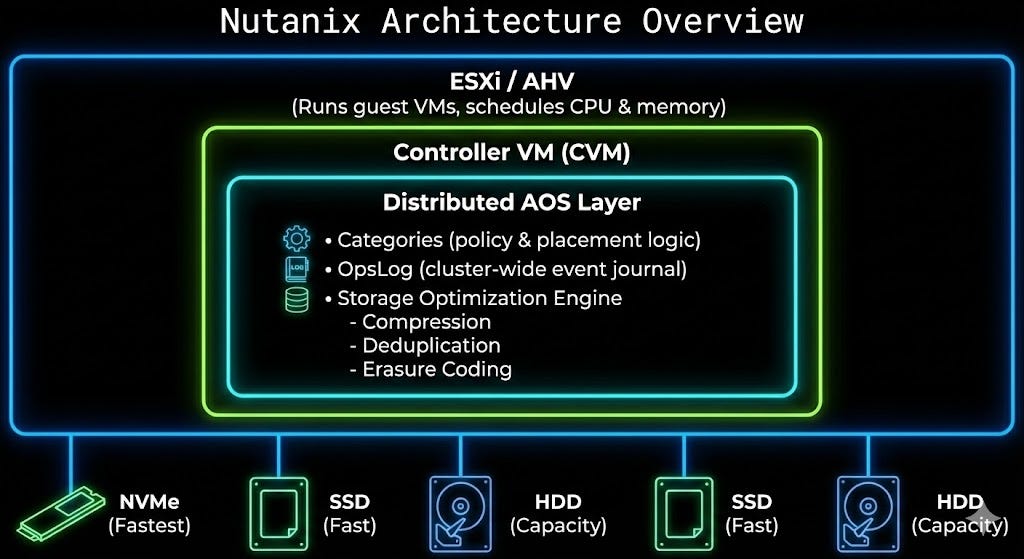
Categories: Policy, Not Placement
Categories are often described as “tags,” which is technically true… and architecturally misleading.
Categories are really policy primitives.
They:
drive placement rules
influence availability and affinity
act as selectors for automation and governance
Instead of asking:
“Where does this VM live?”
Nutanix asks:
“What is this VM, and what policies apply to it?”
Once that clicks, Categories stop being metadata and start being control surfaces.
That shift alone explains a lot of Nutanix’s “why does this feel so clean?” behavior.
OpsLog: The CVM’s Black Box Recorder
OpsLog is one of those components you don’t fully appreciate until something breaks.
It’s not just logging.
It’s a distributed event journal inside the CVM that records:
configuration changes
metadata updates
storage and cluster operations
system-level events across nodes
Because OpsLog lives in the CVM layer:
events are correlated cluster-wide
order of operations is preserved
troubleshooting becomes deterministic instead of guesswork
This is why Nutanix support often knows what broke before you finish explaining that it broke.
It’s not magic — it’s architecture.
Storage Optimization Lives Below the Hypervisor
This was a genuine “wait… oh wow” moment for me.
Features like:
compression
erasure coding
deduplication
are not hypervisor features.
They live entirely inside the CVM and operate at the distributed storage fabric layer.
That means:
they work the same regardless of workload
they’re applied consistently across the cluster
the hypervisor simply consumes storage — it doesn’t manage it
In other words:
AHV (or ESXi) is a client.
The CVM is the brain.
Erasure Coding: Capacity Efficiency Without RAID Thinking
Erasure Coding in Nutanix isn’t something you “build” the way you would a RAID group.
It’s:
policy-driven
automatically applied
optimized for cold or capacity-focused data
The CVM decides:
when data qualifies
where fragments live
how resiliency is maintained without performance penalties
No LUNs.
No rebuild anxiety.
No manual layout decisions.
This is storage efficiency without humans constantly getting in the way.
Deduplication: Global, Inline, and CVM-Aware
Deduplication works because the CVM has global visibility across the entire cluster.
That allows it to:
identify duplicate blocks across VMs
inline dedupe before data is committed
maintain efficiency without application awareness
It’s cluster-native, not bolted on after the fact.
Why This Matters (And Why It Finally Clicked for Me)
Once you realize all of this logic lives inside the CVM, everything starts to make sense:
why Nutanix feels “self-driving”
why operations scale linearly
why failure domains are clean and predictable
The hypervisor runs workloads.
The CVM runs the platform.
That distinction is the moment Nutanix stopped being confusing for me — and started being obvious.
And if it took me a while to get here… there’s a good chance I’m not the only one.
— Dmitry
#dmitrywashere
Shameless Plug (Completely Unrelated to Any Exam Objectives)
As I kept pulling on this thread, I’d be lying if I said my Pure Storage brain didn’t start firing a little. Because one of the more interesting real-world patterns I keep seeing is Nutanix clusters paired with Pure Storage FlashArray — what’s often called disaggregated HCI.
In a standard Nutanix deployment, storage lives in the CVM on every node, aggregating local disks into a distributed pool. It works well, but at scale it also quietly forces you into a very specific buying pattern: need more storage, buy more compute (whether you want it or not).
When FlashArray is introduced, that model changes completely.
Storage is offloaded to purpose-built controllers running Purity, while Nutanix Prism remains the management plane. Compute scales like compute. Storage scales like storage. No more “t-shirt sizing” gymnastics or explaining to finance why you’re buying CPUs just to get capacity.
And this is where things get fun.
FlashArray brings always-on global deduplication and compression, dramatically reducing footprint without consuming AHV or CVM CPU cycles. In environments full of duplicate OS images, VDI, and structured datasets (hello, SLED), the efficiency gains are often material — not theoretical. Less rack space, less power, and significantly better density than legacy disk or many all-flash alternatives.
Performance also becomes boring in the best possible way. Storage processing is handled by dedicated FlashArray controllers over NVMe/TCP, not by CVMs competing for node resources. The result is consistent, sub-millisecond latency without noisy-neighbor drama — and suddenly that 10–20% of CPU/RAM previously reserved for storage goes back to running actual workloads.
Then there’s resilience and security. FlashArray treats performance variability as a failure condition, uses parity intelligently to work around bottlenecks, and encrypts everything by default. Add SafeMode snapshots, which are immutable even to administrators, and you get a ransomware recovery story that doesn’t rely on hope, screenshots, or “trust me” assurances. For cyber-insurance conversations, that matters.
Operationally, this combo also removes a lot of friction. You don’t need a PhD in storage to run FlashArray. Prism remains the control plane your teams already know, while the array quietly handles data services, non-disruptive upgrades, and lifecycle changes in the background — often for a decade or more thanks to the Evergreen model.
The end result is a genuinely compelling best-of-both-worlds story:
Keep the Nutanix experience your operators love.
Put the data on a platform designed to never go offline.
Totally unrelated to any certifications, of course.